
Using Help Notes for Team Instructions
Help Notes are a GoshLinks Pro feature. They let you add your own team-specific notes below the built-in help instructions inside the plugin.
What Help Notes Are For
Use Help Notes for internal reminders, team processes, client-specific rules, or anything your admins should see while using GoshLinks.
How Help Notes Work
- The standard GoshLinks help text is shipped with the plugin.
- Your notes are stored separately.
- When Pro is active, saved notes are added below the built-in help text under a Notes heading.
- If the licence changes to Free, notes stop showing but remain saved.
- If Pro is reactivated, the saved notes show again.
Adding a Help Note
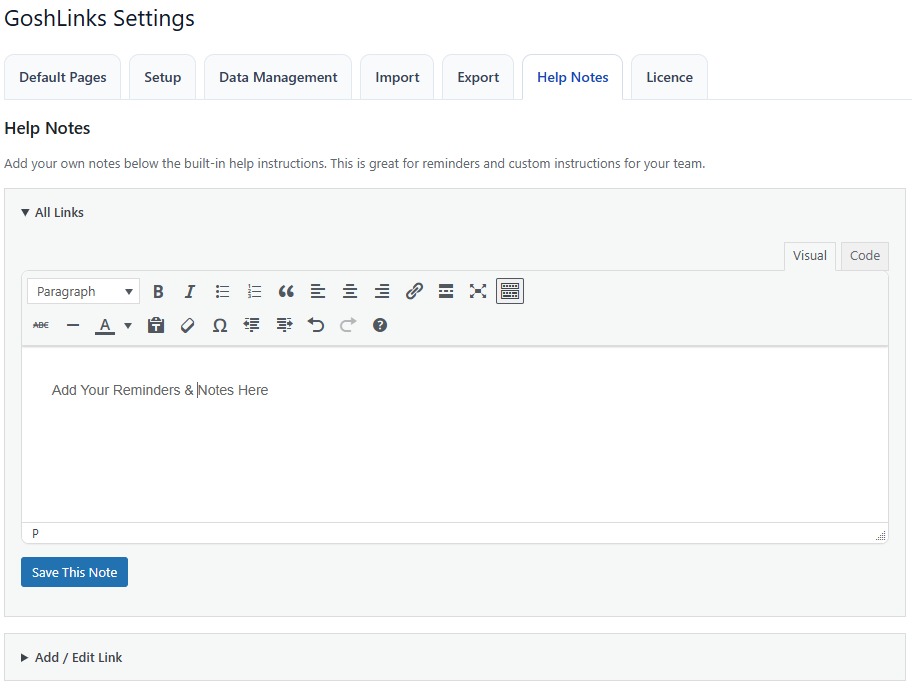
- Go to GoshLinks > Settings > Help Notes.
- Open the accordion for the page or settings tab you want to add notes to.
- Enter your note.
- Click Save This Note.
Available Help Note Areas
- All Links
- Add / Edit Link
- Bulk Editing
- Stats
- Settings: Default Pages
- Settings: Setup
- Settings: Data Management
- Settings: Import
- Settings: Export
- Settings: Help Notes
- Settings: Licence
- Settings: Help Editor
Help Notes vs Link Notes
Help Notes appear in the plugin help panels. Link Notes are saved on individual links and appear in the All Links list.
Tip
Keep Help Notes short and practical. They work best as reminders that help your team make the right choice quickly.